Sunday, November 6, 2016

Before starting with selenium it is required to know "What is Selenium"?

in simple words we can say "Selenium is portable software testing framework for web application"

The test scripting in selenium can be write in HTML tables as well as multiple popular languages and can run in most of the latest web browsers

We can use selenium on different different platforms like linux, windows, Macintosh.

Components of Selenium

  • IDE 
  • RC
  • GRID

Next Lesson  Features of IDE

Saturday, May 28, 2016

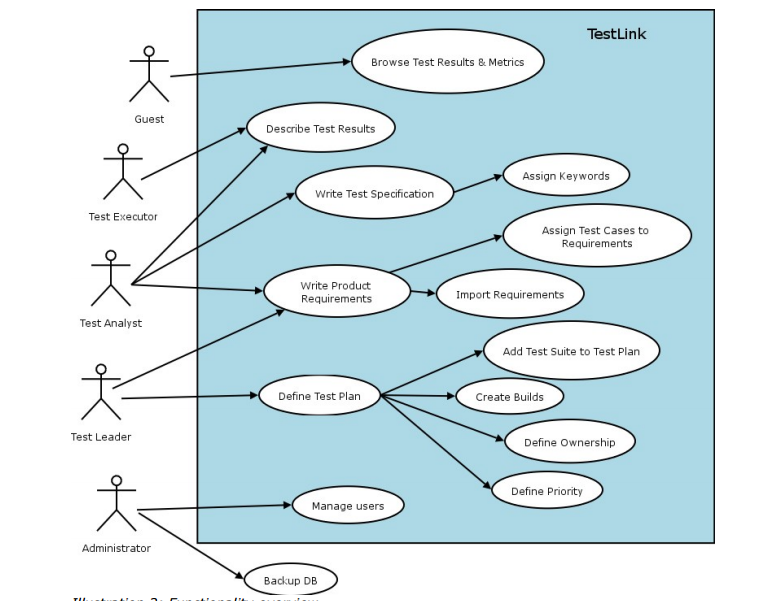
Here we are going to learn about "Testlink Work Flow".   It is step by step approach in test management


Administrator :- Who is responsible to create test project
Test Leader:-  Who create or Import Software Requirement
Test Analyst :- Who describes test scenarios in respect to test specification
Test Executer:-  Who is responsible for creating , executing  test cases and publish test results
Guest:-  who use these test result and metrix. ( Customer/client)
After creating project we need to create user roles. We can create user roles in Testlink and Assign them to users who are going to be part of whole SDLC cycle .  We can create different roles and assign different permission to access Testlink . Like , Business admin , Developer, tester , manager, customer. Etc. so  user with respected role will be able to access only those thing for which role is created.  Now we will look in detail "How to create user roles in Testlink "

Click on user role menu form Testlink menu . It will redirect you to "User Management" page in Testlink 
By default you will see only one user as Admin. We will see in next session about "How to create user in Testlink". Click on "View Roles" . It will display you existing user roles 

Click on Create button 


Enter role name and assign access for role. Enter role description and click on save button . It will create new role. We can use this role to assign any specific user. If you don't want to create new customer then you can use existing roles also or you can modify existing roles . 


General information  about Testlink :-
TestLink is a web-based test management tool that facilitates software quality assurance. It is developed and maintained by Teamtest. You can prepare test cases, test suites, test plans, test projects and user management, as well as various reports and statistics. In our earlier topic we learned about how to Install Testlink on windows 7 

Index 

  1. Testlink Workflow in Detail 
  2. Creating Project in Testlink
  3. Create user role in Testlink 
Here we are going to learn about how to create new project in Testlink.  When you install Testlink on your machine first time and do login to Testlink. It will show you a default screen to create project. Its always needed in process to create a project.


Have closer look on above picture . It clearly asks to add required data in fields to create new project. There are many fields for which we need to enter data. One by one we will learn how to create a test project in Test link 

First we need to add Project Name . Its mandatory field . 


Here we entered project name for our project as " Test Project"
Now moving next we need to add prefix to test case id in test link . Now many of new tester may have question "What is Prefix for test case ID in Testlink ?"  Prefix means the word or character appended as prefix in test case id 
for example 

T-001
Here T is prefix given by me while creating project and 001 is auto generated test case id. So you just need to enter prefix. This is also mandatory field.


Next field for which we need to enter required data is Project Description. Here we have to use simply project description about project. You can yous formatting tools also . 


About enhanced features in Testlink 
You can select if those are required for your project. Its non mandatory. Checking it will provide you some additional  features like, Requirement mapping feature, Priority feature , Automation . 
You can make project availability Active by selecting check box next to Active. If you just want to create a project and dont want to use it immediately you can create it without selecting Active check box 

you can make it Public by selecting check-box . 


Now click on Create button to Create project in Testlink . And you can see your Project is created in Testlink under Test Management 


Friday, March 25, 2016


It might be possible that there may be two teams in project like software developer team and software testing team or more teams in  project. There may be different kinds of functionalities in project and each one developed by different kind of developer teams like DBA, Front end developers  . Tester who test the functionality and verifies software is as per requirement or not also find defects in it. It's always required to have same and good understanding about functionality for both Tester and Developer. Developer need to understand functionality in way to develop it and tester need to understand functionality in way to test it .  In my overall testing experience i also experienced where there may be differences in understanding of both developer and tester on specific functionality. Some times because of bug both developer and tester realizes that there is gap of understanding.  In this situation the best way to tackle situation is  discussion meeting with both developer team and tester team by referencing FRD , SRS document. Its not about more or less discussion its all about fruitful outcome.  So here tester need to play good role to create communication channel in between all teams in process. As tester need to test it in all possible ways and all possible ways means test the all phases. 

Wednesday, April 8, 2015

Here one another topic. Today I am going to discus about Mantis Bug tracker tool . Which is one of widely used bug tracking tool. Mantis is open source bug tracking tool or you can say defect tracking tool. Now days there are many tools available in market both open source and Paid source. Before starting i would like to tell you system requirement .

-Windows PC  with , Wamp server
- 50 MB Disk space.
- Downloaded Mantis setup


Now about Installation of Mantis bug tracking tool in Windows 7 using wamp server
Before starting installation you need to install Wamp server on your machine and start it ( Stop IIS server and then start wamp server). Follow below steps

Copy the mantis folder and store it in Wamp server www root directory.


Open internet Explorer and in address bar type http:// localhost
it will open localhost server screen for Apache server and You can see Mantis folder Under   Your Projects


 Click on Mantis Folder under  Your Projects  You will see  Configuration page for Mantis 


Enter details in fields
Type of Database – MySQL (Default)
Host Name – Local Host
Database Username – root
Database password –root password
Database name – bugtracker
Admin username –  Add this if required
Admin password – add this if required
Print SQL Queries instead of Writing to the Database- Keep it uncheck


Click on button “Install / upgrade Database”

Installation will take place 5 minutes to create database . (Do not refresh the page)


After successful installation it will display screen like this with installation status GOOD / BAD


All installation status need to be in GOOD.Mantis Installation done successfully on Windows 7 step by step


 On Same page go to bottom and click on link
Please log in as the administrator and create your first project.


Mantis default  username – administrator , Password- Root 


Tuesday, January 27, 2015

Starting of testing first time it is need to know how to write test case. Easy to use and Easy to Understand. Many organization now days started to use of  HP Quality center for test case writing Execution and complete testing process . Some organization use Opensource tools like Testlink , also some organization use basic approach is to use of Excel sheet. It's very simple way to start with testing. Here i am prescribing simple format of test case in Excel


Download Sample Test case format in Excel 


Below are the details of simple software test case format 

Project Name :-  Here logical have to write project name . 
Test Case ID :-   It's require to easily identify test case and providing unique id to each test case
Test Case Name :- Name of Test case
Test Priority:-  It's always good to give test case priority. So in case we need to run test cases only high level or priority base then it would be easy.
Product / Module Name:-  Here you can mention Product name or module name. Logically there may be many modules or application in project to test so its easy to categorize test case for specific module.
Description :- You can write detail description about test case and Functionality going to test
Prerequisite :- In every testing there may be some prerequisite need to be completed without it test cannot be performed. It's good to mention prerequisite in test case so executor can verify prerequisite before starting of execution of test case

This is all about header level of test case. Now we will see about detail test case columns 

Step number :- Logically it starts from number 1 its just a step number to identify each step
Test step :- Details about step 
Test data :- Test data is data which is required for testing . E.g- step is Enter user name then test data ill be username "ABCD"
Expected Result :-  Result expected after performing respected step
Actual result :-  Actual result received after performing respected step
Pass/ Fail :- It's status based on actual and expected result. status need to update
Defect ID :- If test case is fail then need to log defect  you can mention defect id here 
Notes :-   Here you can add notes 

Tuesday, December 16, 2014

when we think about what might go wrong we have to consider defect and failure arising from:
below are some sources mentioned  from where detect may come

  1. Error  the specification design and implementation of the software system
  2. error in the use of system
  3. environmental conditions
  4. intentional damage

now have look in above picture requirement number 1. Here you can see that requirements are correct , design is a correct build is also deployed correct and finally the product is working as expected to the requirement.so here there is no defect found due to each and every step is working fine. Now have a look on requirement number 2 in same picture you can find that there is a mistake made in build and due to which product is not working fine so defect found in production also. Now look into the requirement no 3 same picture here you can see that mistake is made im design due to which build meet the design which is not correct and hence the product is not working fine.
now have a look in requirement 4 here mistake is made in requirement due to which the design goes wrong due to which build meet the design which is wrong and hence the wrong product delivered

in all about 4 requirements you can see that reasons behind the defects can be anything. so it's very important while creating requirements, design , buipd ,, product that we are creating them correct

Sunday, August 17, 2014


Thursday, May 8, 2014

After building software sometimes software doesn't work as expected shows bugs , errors. Why is that software system doesn't work as expected ? There may several possibilities of thes


  1. Someone used software incorrectly 
  2. Someone makes error or mistake in software
  3. Someone add invalid inputs in software
  4. Incorrect development 
  5. Issues in development 
  6. Testing missed bugs.. 
There may be many more reasons why the software is not working as expected. It's depend on situation in which error or bug occurs. 

Do our mistakes matter to software? will they hamper ?

 Will discuss about effects of defect now. Its true that any in software development life cycle every entity human being like Business Analyst, Customer, Technical Architect, Programmers and Testers included, can make an error. These errors may produce defects in the software code or system, or in a document. If a defect in code is executed then the system may experience a failure. So the mistakes everyone in life cycle matter partly. It's severity depend on bug.

Our mistakes are also important because software systems and projects are complicated. Many interim and final products are built during a project, and people will almost certainly make mistakes and errors in all the activities of the build. Some of these are found and removed by the authors of the work, but it is difficult for people to find their own mistakes while building a product. And if bug occur in production then it may impact whole business.(Depend on severity).  

Tuesday, May 6, 2014

Test case is set of conditions, steps , variables using which tester need to test application or software in step by step manner to find out , verify , validate software is as per requirements and detect defects. 
There may be many set of test cases to fulfill requirements .Main characteristics of a test case is that there is a known input  and an expected output (Expected Result ), which is worked out before the test. The known input should test a pre-condition and the expected output should test a post-condition ( Actual Result).

Sunday, March 16, 2014

Bugzilla is opensource software which mean no need to pay cost to use it. It's basically used for bug tracking or bug management. In software testing when tester test any software or application and found a bug then it need to be logged or record somewhere to get resolved or future use. Bugzilla is the best opensource software used in market by small scale companies as well as big companies. It's very easy to use software. Partially difficult to install on Windows os. I will give brief information about how to install Bugzilla in my next post.  Before starting to work on Bugzilla it's good if you know what are the features of Bugzilla. Below are the features of Bugzilla.

  • Advanced Search Capabilities
  • Email Notifications Controlled By User Preferences
  • Bug Lists in Multiple Formats (Atom, iCal, etc.)
  • Scheduled Reports (Daily, Weekly, Hourly, etc.) by Email
  • Reports and Charts
  • Automatic Duplicate Bug Detection
  • File/Modify Bugs By Email
  • Time Tracking
  • Request System
  • Private Attachments and Comments
  • Automatic Username Completion or Drop-Down User Lists
  • Patch Viewer
  • "Watch" Other Users
  • Move Bugs Between Installs
  • Save and Share Searches
And many other features. One of more important feature of using Bugzilla is you can link it with other test case management tools like Testlink, Quality Center and many more. 

Popular Posts